Notice: This page is still under development and currently being built. It is not yet intended for the public and will still change in content and appearance.
 12 Ski · iPhone & Apple Watch
OneTwo Ski, “12 Ski” on your iPhone, records skiing, snowboarding and cross-country, knows slopes and lifts from 36 regions offline and saves every ski day as a workout in Apple Health. Plus emergency numbers for 119 countries and a meeting point for your group.
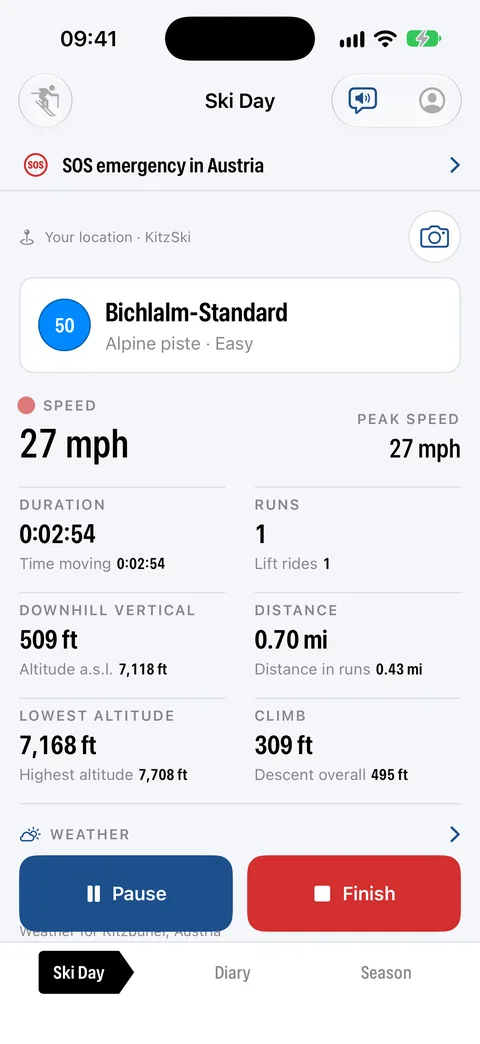
Real footage from the app: Ski Day, map, meeting point, logging, diary and season, with sample data from Obertauern.
AI-generated voice (OpenAI). Recorded in the iOS Simulator with the app’s sample data. In the logging scene the location comes from location simulation and the photo is a Simulator test image. Weather: Apple Weather, map data © OpenStreetMap contributors.
Real screens from the app in its current design with the captions from the App Store; the ski day is made up. Tap a chapter, swipe or zoom.
Ready to start Press and hold to start1 / 12
Start from your wrist Your most recent entry below1 / 3
The watch starts, pauses and finishes the recording, measures your heart rate and sends the meeting point. The iPhone always records the route.
Three sports with their own metrics. Tap one; highlighted is what the app shows for it.
Heart rate, zones and training load need Apple Health or an Apple Watch. Tap the speed to see your pace. Missing values show as “–”.
Slopes, trails and lifts from OpenStreetMap are inside the app: 36 regions, roughly 3,900 ski areas, slopes coloured by difficulty. They work offline and without a subscription. Only the Apple base map needs a connection.
Slope and trail data: © OpenStreetMap contributors (ODbL) · Data source and download. The data may be incomplete or out of date and says nothing about whether a slope or lift is open.
Tap a part of the elevation profile.
The barometer keeps altitude accurate. The app filters out GPS outliers.
Three rows are ready in your ski day, like signs at the valley station. All without an account and without a developer server. Weather and SOS can each be hidden in Settings.
The emergency numbers are stored in the app and never transmitted. For the meeting point, your position leaves the iPhone only in the message you send yourself.
What makes OneTwo Ski a fitness app: Apple Health, calories with the formula disclosed, heart rate zones and training load.
No heart rate, no zones and no training load.
Sample values. Zones and load are guidance, not a medical assessment.
“Pull heart rate from Health” and “Save to Health” are off by default. The app works without Health and a watch.
Goal: 20 ski days a season14 of 20 done
Sample values.
So nothing happens by accident on the mountain and the battery lasts.
Everything 12 Ski shows outside the app, redrawn from the widget sources. Values are examples.
Sport, name of the last entry, distance and duration. A tap opens the Ski Day tab; nothing starts.
Like small, plus peak speed. While logging, the widget shows the running time with a red dot instead.
Circular: the sport icon, with the running time while logging. Rectangular: name and distance of the last entry.
Sport, duration, speed with peak, altitude, distance and heart rate. The button pauses or resumes without unlocking.
Compact: icon and current speed, the pause symbol while paused. Expanded: the same values as on the Lock Screen, button included.
For Control Center, Lock Screen and the Action button: “Start ski day” opens the app and starts right away; “Pause/Resume” acts on the running log without opening the app.
Widget, Live Activity and Controls come with the app, no subscription. All labels are the app’s own; Live Activity and Controls need iOS 18 or later.
iCloud sync is optional. If a ski day changes on two devices, you decide. Try it:
Powder on Saturday
Tag: Powder
Family day on Saturday
Tag: Family
No ads, no analytics, no server.
Heart rate, calories, zones and body data are never synced via iCloud. They stay on the device and in its backup.
In the background only during a recording.
Only your private iCloud. The developer sees nothing.
GPX or TCX for other apps, the ski day as an image, a ski pass image of the season. Heart rate only if you switch it on when sharing.
Firn, Snow, Glacier, Alpenglow and Pine in light and dark. Metric or imperial, in twelve languages.
Everything else is in the privacy policy.
Twelve things 12 Ski does. All included in the purchase, none behind a subscription.
36 regions, roughly 3,900 ski areas from OpenStreetMap inside the app. Slopes coloured by difficulty, lifts and trails included, offline and without a subscription.
The top of your ski day tells you where you are: name, number and difficulty of the slope, or the lift you are sitting in, with the lines next to it.
The app splits the day for you. The gondola down does not count as a run. Wait time per lift and steepness per run are shown.
Emergency numbers for mountain accident, rescue, police, fire brigade and air rescue, offline and fixed at the top of your ski day. The app never dials by itself.
“I’m here” or “Meet at …” with huts and lifts within 3 km. As an Apple Maps link through the share sheet, also from the watch. No server.
Apple Weather: now, hourly and seven days, with fresh snow of the last 24 hours, wind and gusts. The weather stays saved with the ski day.
With route, breaks, distance, elevation gain and active energy, lifts excluded. Calories from the watch, from heart rate or by MET; the method is always shown.
Start, pause and finish from your wrist, live heart rate, meeting point button. The iPhone always records the route, which saves the watch’s battery.
Track coloured by speed, altitude or heart rate, kilometre markers, elevation profile, heart rate chart, charts per run and the day timeline.
Week, month, year and season with last year and last season. Goals with a progress ring, season review with favourite area, slope collection and ski pass image.
Photos from the built-in camera land on your track, with position and heading on the map.
“Most Recent Entry” as a widget, Live Activity with a pause button without unlocking, two controls for Control Center and the Action button, Siri “Start 12 Ski”.
Six reasons, checked against what other winter and summer apps offer. The figures are in the table below.
€2.99 one-time, no account, no subscription, no ads, no tracking. All features, including watch, widgets and controls, are part of the purchase.
Competition: According to vendor information (as of November 2026): Slopes, Ski Tracks, Strava and adidas Running sell parts of their feature set as a subscription; Slopes, Skiline, Strava, Komoot and adidas Running need an account.
36 regions with roughly 3,900 ski areas from OpenStreetMap are inside the app. Slopes, trails and lifts work offline; the trail sign shows name and difficulty.
Competition: According to vendor information (as of November 2026): Slopes offers slope map and slope name only with a subscription. Ski Tracks and Skiline have no slopes in the app.
Every ski day as a complete workout with route and calories, live heart rate from the watch, heart rate zones and training load. Health values stay on the device.
Competition: According to vendor information (as of November 2026): Skiline writes no workout to Apple Health and has no watch app.
Lifts, gondolas and breaks do not count towards distance, top speed and calories. Under every value you see how it came about; the “Where the numbers come from” help shows the formulas.
Competition: The vendor information of the six compared apps lists no disclosure of formulas.
Emergency numbers for 119 countries offline, meeting point as an Apple Maps link through the share sheet. Your position goes only to the person you choose.
Competition: The compared apps' vendor information lists no offline SOS numbers. Sharing location: Slopes only with an account, Strava only with a subscription, according to the vendors.
OneTwo Ski is winter. For walking, hiking, Nordic walking, jogging, mountain bike, e-bike and road bike there is the sister app OneTwo Sports, same price, same attitude. If you want more guidance for 20 winter sports, you will find it in Snow Compass.
OneTwo Ski next to three winter and three summer apps.
| OneTwo Ski | SlopesWinter | Ski TracksWinter | SkilineWinter | StravaSummer | KomootSummer | adidas RunningSummer | |
|---|---|---|---|---|---|---|---|
| Price and privacy | |||||||
| Price | €2.99 one-time | Subscription (Premium) | Subscription | free | Subscription (Premium) | Subscription + map purchases | Subscription (Premium) |
| Works without an account | ✓ | ✗ | ✓ | ✗ | ✗ | ✗ | ✗ |
| Data stays on the device, no vendor server | ✓ | ✗ | ✓ | ✗ | ✗ | ✗ | ✗ |
| No ads, no analytics or tracking SDKs | ✓ | ? | ? | ? | ? | ? | ? |
| Optional iCloud sync, you resolve conflicts | ✓ | own cloud service | ✗ | own cloud service | own cloud service | own cloud service | own cloud service |
| Sports and detection | |||||||
| Sports with their own metrics | 3: ski, snowboard, cross-country | Ski, snowboard | Ski, snowboard | Ski | 30+, generic | about 10, outdoor | Running, walking, cycling |
| Slopes, trails and lifts offline in the app (OpenStreetMap, 36 regions) | ✓ | ◐subscription only | ✗ | ✗ | – | – | – |
| Run, lift and break detected automatically | ✓ | ✓ | ◐runs, no lifts | ◐turnstile only | – | – | – |
| Name and difficulty of the current slope | ✓ | ◐subscription only | ✗ | ✗ | – | – | – |
| Safety | |||||||
| SOS emergency numbers for 119 countries, offline | ✓ | ✗ | ✗ | ✗ | ✗ | ✗ | ✗ |
| Share a meeting point as a message, no server | ✓ | ◐friends, account needed | ✗ | ✗ | ◐Beacon, subscription | ✗ | ✗ |
| Analysis and fitness | |||||||
| Goals and season or year review | ✓ | ◐subscription | ✓ | ✓ | ◐subscription | ✗ | ✓ |
| Track coloured by speed, altitude or heart rate | ✓ | ✓ | ✓ | ✗ | ◐ | ? | ? |
| Photos with position and heading on the map | ✓ | ◐no heading | ✗ | ✗ | ◐no heading | ◐no heading | ◐no heading |
| Apple Health: workout with route and calories | ✓ | ✓ | ✓ | ✗ | ✓ | ✓ | ✓ |
| Formulas disclosed (“Where the numbers come from”) | ✓ | ✗ | ✗ | ✗ | ✗ | ✗ | ✗ |
| On the go | |||||||
| Weather with forecast in the app | ✓ | ? | ? | ? | ◐after the fact | ✓ | ? |
| Apple Watch | ✓ | ✓ | ✓ | ✗ | ✓ | ✓ | ✓ |
| Widgets and Live Activity | ✓ | ✓ | ? | ✗ | ◐ | ◐ | ? |
| Voice announcements | ✓ | ? | ✗ | ✗ | ✓ | ✓navigation | ✓ |
| Export as GPX/TCX | ✓ | ✓ | ✓ | ✗ | ✓ | ✓ | ✓ |
Legend: ✓ included · ◐ partly or subscription only · ✗ not listed in the vendor information (does not mean the feature is missing) · – not applicable to this app · ? no reliable information
As of November 2026. Sources: publicly available vendor information, App Store listings and vendor websites, retrieved in November 2026. What is not mentioned there is marked “✗”, even if the app may offer it. The selection of apps is not a rating or purchase recommendation. Please report errors or changes to support@onetwoapps.com; I will correct them promptly. Prices and features may change. Slopes, Ski Tracks, Skiline, Strava, Komoot and adidas Running are trademarks of their respective owners. OneTwoApps is not affiliated with these providers.
A simulated ski day in your browser. No location is requested and nothing is sent.
Pick a sport, press and hold Start, go. Time runs 30 times faster.
No photos yet. Tap the camera while skiing.
Example entries. Ski days from the simulator appear at the top and stay in this browser only.
One-time · No subscription · No in-app purchases · No ads
The Apple Watch app is included in the purchase. You pay once and use the app without recurring or hidden costs.
12 Ski, the winter sports fitness app for iPhone and Apple Watch. Hold Start for 0.8 seconds, and off you go.
Coming soon to the App StoreNo. The app also works with just your iPhone. With the watch your heart rate comes in live, the watch measures calories itself, and you control the recording from your wrist. The iPhone always records the route.
The Move ring counts the active energy of the whole day, not just your ski day. When Apple Watch measures the workout, OneTwo Ski uses exactly its value. Without the watch the app estimates from heart rate or movement and leaves out lifts, gondolas and breaks.
No. OneTwo Ski is a sports and fitness app. Heart rate zones and training load are a guide for your training, not a medical assessment.
The slope data for 36 regions worldwide is built into the app, so you see slopes, trails, lifts and gondolas even without a signal. Apple's base map needs a connection and is limited offline; satellite and hybrid are online only.
Recording keeps running with the iPhone locked. If the app quits unexpectedly, it resumes the recording with all points so far the next time you open it.
Yes. Share any ski day as an image or export it as a GPX or TCX file, for example for Strava, Komoot or Garmin Connect. Heart rate is only included if you turn on “With heart rate”. If you like, the app also saves the ski day as a workout in Apple Health.
Yes, off by default. Once on, you hear every run, distance, time, average speed and heart rate every 1 to 10 kilometers or miles, and a summary on pause and after saving. Lift rides do not count toward the distance. The “Announce” button works any time.
Yes. There are five colour schemes in light and dark: Firn (default), Snow, Glacier, Alpenglow and Pine. Units follow the system or you fix them to metric or imperial. The app is available in twelve languages: English, German, French, Spanish (Spain and Mexico), Italian, Dutch, Portuguese (Brazil), Japanese, Korean and Chinese (Simplified and Traditional). In Settings you can pick the language independently of your iPhone.
In the diary you search by name or note and filter by tags, color tags and time period. With “Ask Diary” you search in your own words, for example “fresh snow last season” or “more than 15 runs in January”; the app shows the matches with totals. When you edit an entry, it suggests matching keywords you already use. And “Ask Help” at the very top of the help finds the right section of the help. Everything stays on your iPhone.
No. OneTwo Ski ships for iPhone (iOS 18 or later) and Apple Watch, plus widgets, Live Activity and two controls. There is no separate iPad or Mac version.
Location records the route, Motion provides the barometer for more accurate altitude, the camera takes photos during a recording, Photos (add only) optionally puts a copy in the Photos app. Health reads heart rate, resting heart rate, weight, date of birth and sex for calories and heart rate zones and saves your ski days as workouts. Camera, photos and Health are optional.
No. The SOS row shows the emergency numbers of the country you are in, for 119 countries and offline. You tap a number, and iOS asks before every call. There is no automatic emergency alert and no fall detection in the app.
12 Ski is the fitness app for skiing, snowboarding and cross-country with slopes and lifts offline, Apple Health and a season review. OneTwo Sports is the sister app for summer with walking, hiking, jogging and cycling. Snow Compass guides 20 winter sports with goal navigation and ten-day weather, but without slope data and run detection.
