App Ratings & Reviewsfor macOS

A script for the Mac · App Store Connect and Google Play

Google Play forgets your reviews after seven days. Apple counts crashes from today on.

This script fetches your apps' ratings, reviews and crash data every day and keeps them on your Mac. Out of that grows your own uninterrupted history, a report in the browser and a summary you can pass on.

1command
2stores
3results
0servers, cloud, tracking
Terminal
~/app-ratings-reviews ❯ ./ratings.sh all Fetch 13 targets · 6 apps · Apple and Google Pocket Gardener Apple reviews ✓ ok 1.4 s 3 new TrailMate GPS Apple reviews ✓ ok 2.0 s 5 new Sleepy Sounds Apple reviews ✓ ok 1.4 s 2 new Quiz Rocket Apple reviews ✓ ok 2.0 s 4 new 1 changed Pocket Gardener Google reviews ✓ ok 1.3 s 2 new Habit Hero Google reviews ✓ ok 1.5 s 1 new TrailMate GPS Apple stability ✓ ok 1.4 s 8 days … 6 more targets Runtime 25.1 s · 13 targets · 0 errors · 59 new · 1 changed · 1,845 totalReport built → reports/report.html · browser openedMarkdown → reports/markdown/ · 6 files + ZIP
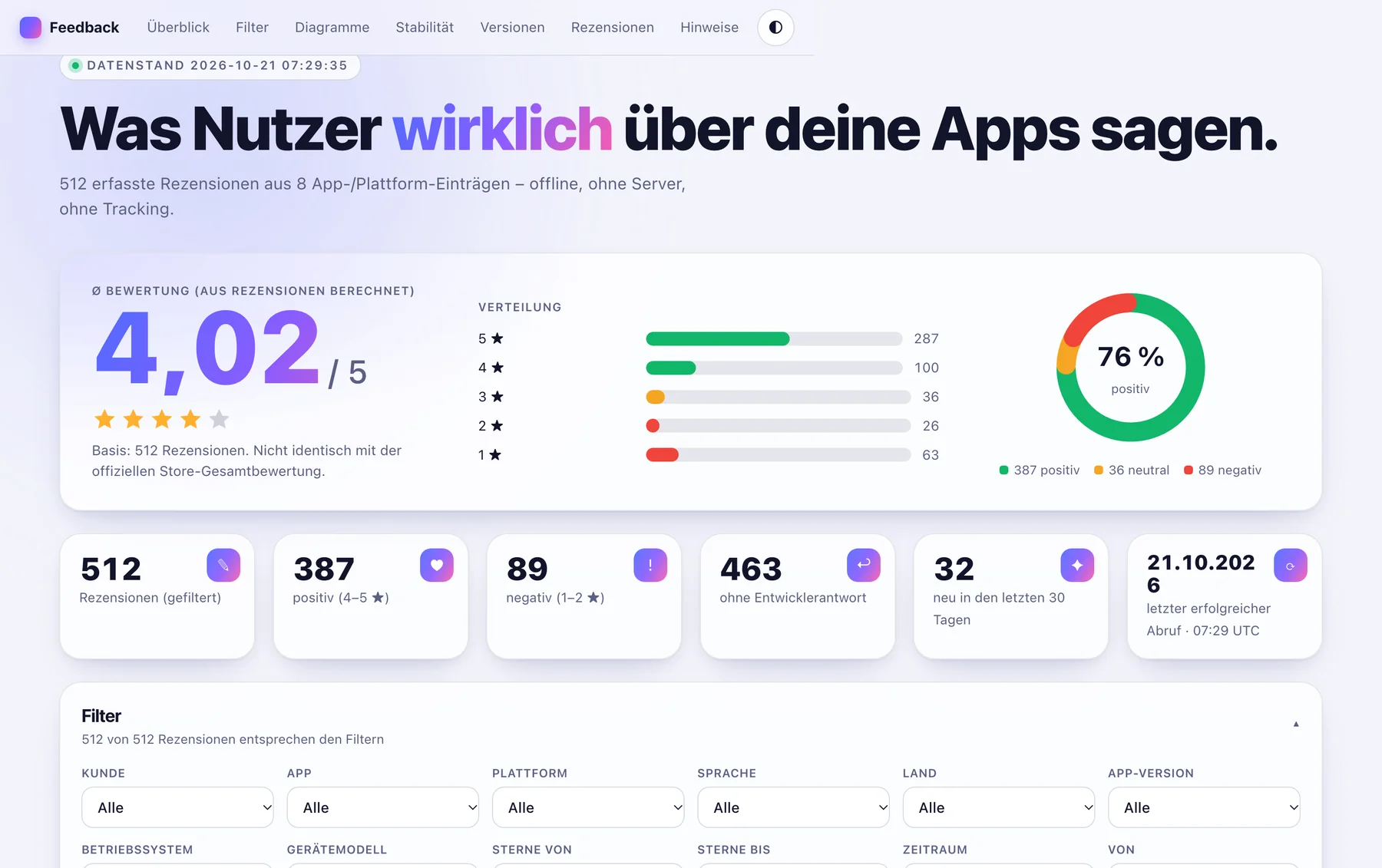
The report in the browser: 4.02 stars on average from 512 reviews, distribution and 76 % positive
reports/report.html · opens by itself

For Apple. For Google.

Both stores know a lot about your apps. Neither keeps it for you.

The script takes from each store what it offers and fills the gaps it leaves.

App Store

App Store Connect API · Apple Analytics

What Apple provides
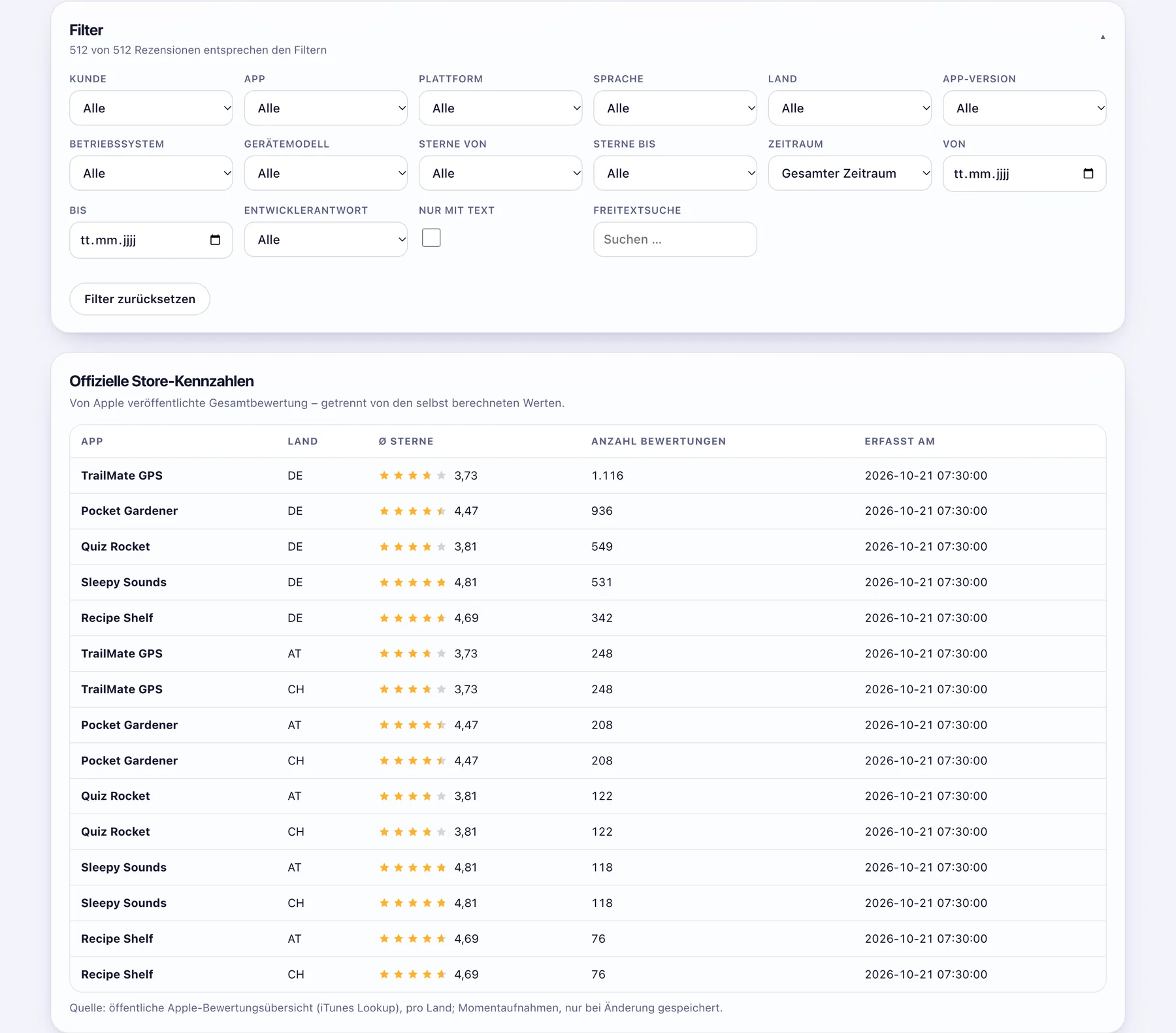
Reviews from every country with the developer's reply, the official store rating per country, plus sessions and crashes per day, version, iOS version and device.
What Apple keeps from you
Stability data exists only from the day you set it up. Reviews carry no app version and no device. Very small data sets are hidden entirely.
What the script makes of it
A crash rate per 1,000 sessions you can place next to the negative reviews week by week. And a history that never breaks off again after your first fetch.
Google Play

Google Play Developer API · CSV import

What Google provides
Reviews with app version, device and Android version, with language and the developer's reply. More context per review than Apple.
What Google keeps from you
The API returns only the reviews of the last seven days. Whatever you do not collect in that window is only available through the Play Console CSV export.
What the script makes of it
A daily fetch that looks back more than seven days and recognises duplicates. Older reviews are imported once from CSV, after that it runs by itself.

The gap

What the stores show you, and what stays on your Mac.

The same 120 days, three times. Each bar is one day with data.

Google Play APIreviews of the last 7 days
120 days ago113 days gonetoday
Apple Analyticscrashes only from setup on
120 days agoset uptoday
With the scriptfetched daily, kept locally
120 days ago120 of 120 daystoday

That is why daily. The script remembers per app when the last fetch succeeded and only collects what is new the next time. Several runs a day are harmless, there are no duplicates. With ./ratings.sh daily it runs by itself via cron or GitHub Actions.

30 seconds

From command to report, played through once.

A short film about the script, with sound.

One command, three results

What is on your Mac after ./ratings.sh all.

Everything is a file. You can open, copy, send or archive it.

01

The report in the browser

A single HTML file that works offline. Stars, distribution, trend, versions side by side, stability per device, and every review in full text with filters for app, country, language, stars and period. Export as CSV or JSON.

reports/report.html
Report with filters and official store figures
02

The summary to pass on

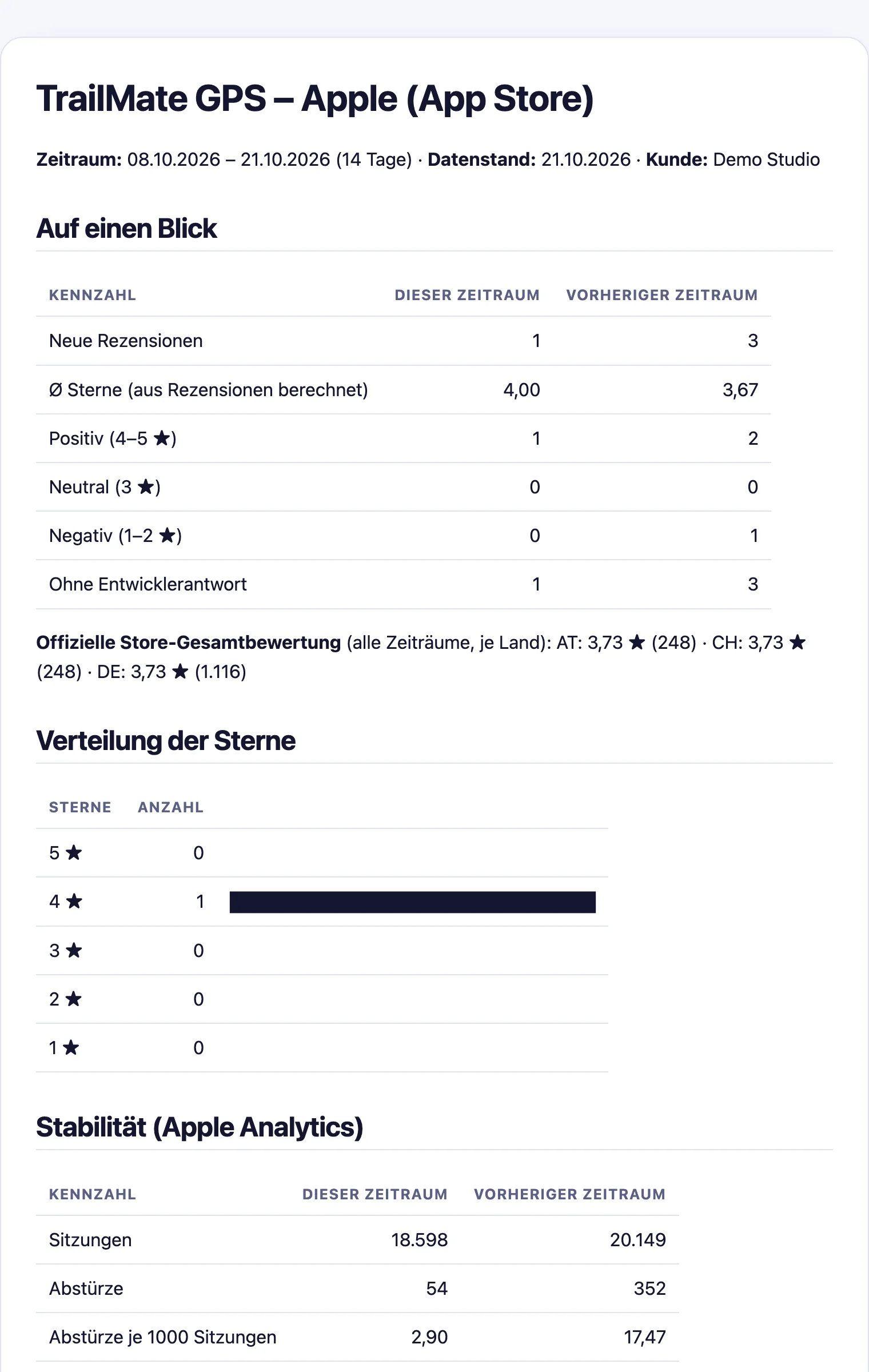
One Markdown file per app and store covering the last 14 days: figures against the previous period, stars, stability and the new reviews. Pastes into Mail, Slack or a wiki without losing its formatting.

reports/markdown/trailmate-gps-apple.md
Markdown summary of TrailMate GPS with comparison to the previous period
03

The overview and the ZIP

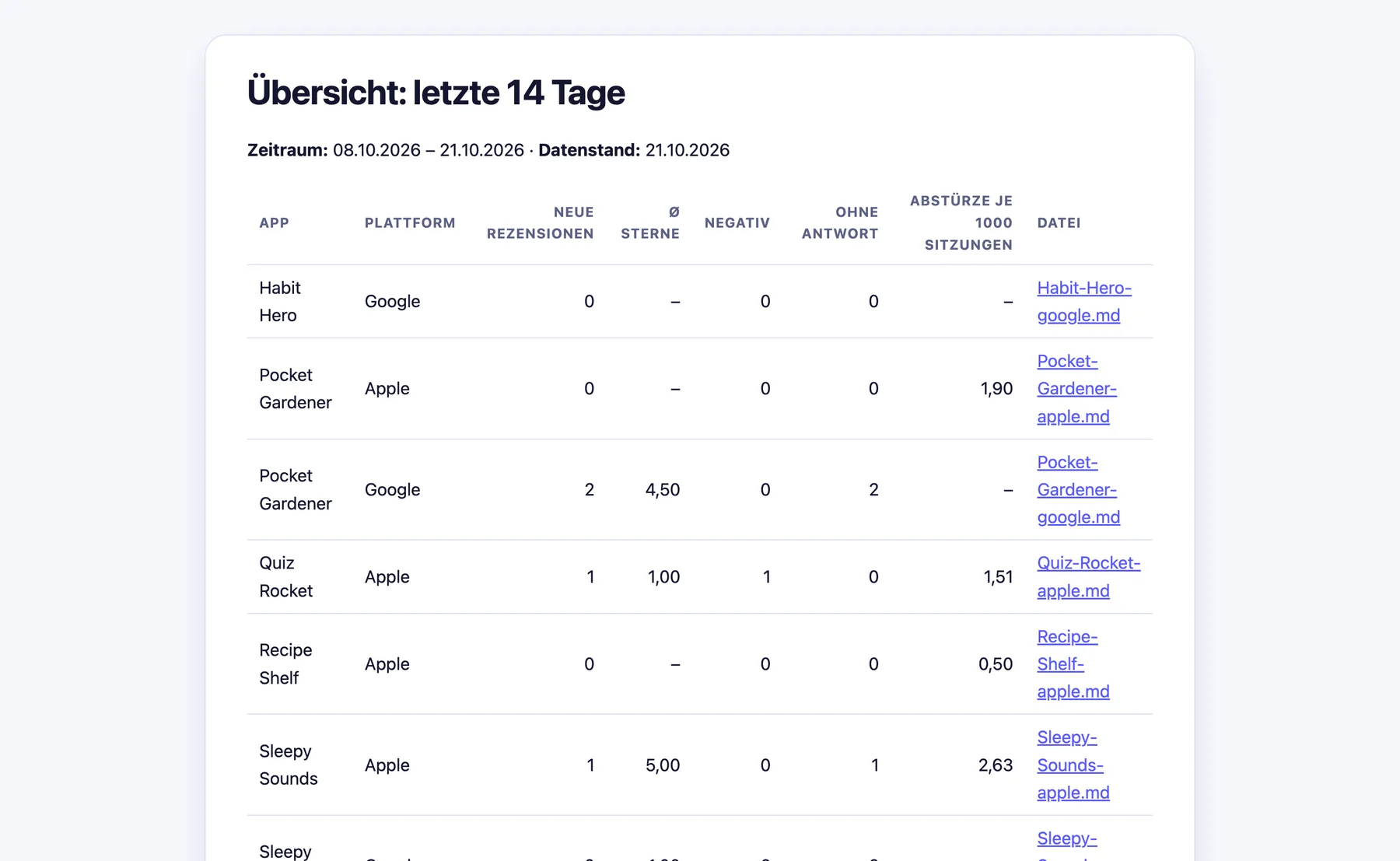
An overview of all apps in one table, linking to each app's file. Plus a ZIP with all summaries, ready to send to colleagues or clients.

reports/markdown/uebersicht.md · markdown.zip
Markdown overview of all apps for the last 14 days

The material

512 texts become one number, and the number stays verifiable.

Every review is compared with the previous state on each fetch: new, changed or unchanged. Changes go into their own history.

4.02/ 5

calculated from 512 reviews, kept separate from the official store rating

5 ★287
4 ★100
3 ★36
2 ★26
1 ★63

An example

One update, two signals, seven weeks.

TrailMate GPS, autumn 2026. This is what it looks like when crashes and reviews share one picture.

Week 3 · version 3.0

The crash rate jumps

After the update the rate climbs from 3.3 to 17.47 crashes per 1,000 sessions. You see it in the report the next morning, not in the next quarterly review.

Weeks 3 to 5 · reviews

The reviews turn

Negative reviews pile up in exactly the same weeks. The weekly chart lays both on top of each other.

“Since 3.0 the app closes every time I open the map.”
Stability by device

Narrowing down the cause

The tables by version, iOS version and device show: iPhone 3.9, iPad far more. The problem sits in the map view on the iPad.

Week 5 · version 3.0.1

The fix works, and it is in writing

The Markdown summary of the next 14 days proves it: 2.90 per 1,000 sessions, average stars from 3.67 to 4.00. That is the file you send to the client.

“Map works again on iPad. Thanks for the quick update.”
TrailMate GPS · Appleweekly
09-0709-1409-2109-2810-0510-1210-19 3.0 iPad 3.0.1 17.47 2.90
crashes per 1,000 sessionsnegative reviews (1–2 ★)

Set up

Five minutes, then it runs every day.

You need Python 3.10 or newer. If your Mac lacks it, macOS installs it with the Command Line Tools the first time you run python3. The script installs its single dependency itself.

1

Download

Get the repository onto your Mac. It is public and free, no account needed. There is no further installation.

git clone https://github.com/drapatzc/app-ratings-reviews-online.git
cd app-ratings-reviews-online

Repository on GitHub

2

Enter credentials

The Apple key (.p8) and, if needed, the Google service account come as a file or environment variable. Never in the config.

cp config/config.example.json config/config.json
# enter apps, issuer ID, key ID
export APPLE_PRIVATE_KEY=~/AuthKey.p8
3

Start the menu

Key 1 fetches everything, builds the report and opens the browser. H shows help in every menu, Q quits. For everyday use the short menu with three items is enough: fetch, status, report.

./menu.sh
# short menu:
./kurzmenu.sh
# or without the menu:
./ratings.sh all
macOS with Python 3.10 or newer; for continuous operation also Linux or Windows serversApp Store Connect API key, role Customer Support or higherFor Android: Google service account with read access in the Play Console
./ratings.sh allfetch, report, browser
./ratings.sh fetchfetch only
./ratings.sh stabilitycrashes and sessions only
./ratings.sh reportreport without network
./ratings.sh markdownsummaries and ZIP
./ratings.sh dailyfor cron, once a day
./ratings.sh statusstate of all apps
./ratings.sh dry-runtrial run, saves nothing
./ratings.sh import-csvolder Google reviews

Privacy

Three things the script does not do.

It sends nothing away.

The data sits as JSON files on your Mac. No server, no database, no cloud. The report is a single HTML file and works offline.

It stores no keys in the config.

The Apple key and the Google service account come as a file or environment variable. Keys inside the config are rejected, logs are redacted.

It deletes nothing on its own.

Every fetch adds. Deleting is a deliberate act, with a backup in backups/ and a typed confirmation.

Questions

Is the average the official store rating?

No. The average in the report is calculated from the collected reviews. The official overall rating per country is listed separately in the table “Official store figures”.

What happens if I fetch several times a day?

Nothing bad. There are no duplicates, and within a 30-minute waiting period the script sends no requests at all. --force overrides that.

Why are app version and device missing for Apple?

The App Store Connect API does not provide them for reviews. For Apple, versions, devices and iOS versions come from the stability data. Google delivers them with the review.

Can I import older Google reviews?

Yes, once via the Play Console CSV export: menu item 7 or ./ratings.sh import-csv.

Several clients, many apps?

Any number of clients and apps in one config. Fetch, report and Markdown can be limited per client, app and platform.

Is the report available in English?

Menu and report are currently in German. The ratings.sh commands are English.