Write, improve, translate – all in one app. Your versatile writing assistant for iPhone and iPad.

A look inside the app.
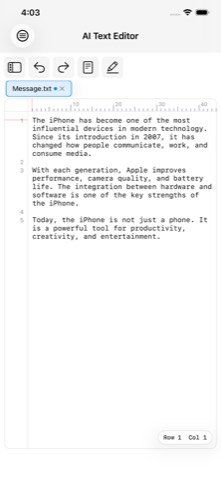
AI Text Editor is your versatile writing assistant for iPhone and iPad. Whether notes, emails, letters, blog posts, or social media posts: you write in a clear, distraction-free interface and bring in AI support whenever you need it – with your own API key from the provider of your choice. Without AI, the app remains a full-featured text and Markdown editor, with no cloud requirement. Your documents belong to you: stored locally, optionally synced encrypted via iCloud.
An honest, focused text editor that doesn't hide AI as a black box, but makes it transparent and controllable. No subscription, no in-app purchases, no hidden AI costs via an intermediary server.
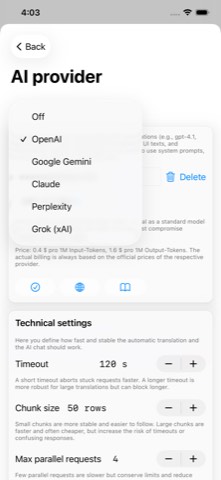
OpenAI, Anthropic Claude, Google Gemini, Perplexity, and xAI Grok. Switch anytime with a single tap.
You pay for AI usage directly with the provider, with no markup and no middleman.
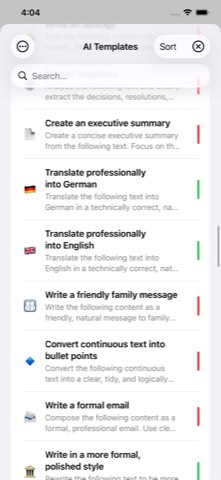
Add standard templates with a tap, or create your own with a title, emoji, and custom prompt.
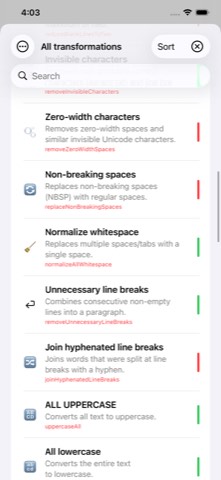
From cleanup to slugify – completely offline and without AI.
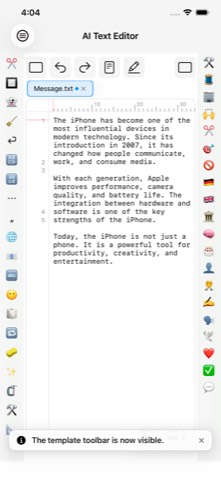
Local transformations on the left, AI templates on the right – a convenient emoji palette.
Including conflict handling: keep the local version or adopt the cloud version.
With a tab bar and indicators for unsaved changes.
AirPrint, save as PDF, share as a Markdown file, and import text files.
API keys only in the Keychain, an explicit consent dialog before first AI use per provider, offline detection.
A snapshot is automatically taken before every AI action. Nothing is ever lost.
The app in everyday use – from the editor to AI integration.
The editor. The editor is deliberately designed so you can start writing immediately: no cluttered menus, no distractions. AI Text Editor manages your documents in its own searchable library instead of folder structures. A distinctive feature is working with several documents at once – open texts appear in a tab bar, and unsaved changes are clearly marked. For Markdown, handy helpers are available: headings, bold, italic, strikethrough, code formatting, and tables, without needing to memorize the syntax. The interface adapts to iPhone and iPad alike. And before an AI action changes your text, the app automatically sets a save point – so you can experiment safely.
iCloud, printing, and sharing. Your documents are first stored locally, and with iCloud enabled they additionally land automatically in your private, encrypted iCloud database – synced across all your devices, with no setup required. If you've edited the same document on two devices, the app reliably detects the conflict and lets you choose which version applies. Using the system print dialog, you print via AirPrint or save your document as a PDF; to share, the app generates a Markdown file for the Share Sheet. None of this requires an API key or AI – this basic functionality works from the very first launch.
AI services. The AI integration is 100% optional and sits right where your text is created: correct spelling and grammar, shorten or elaborate texts, write more formally or casually, switch between informal and formal address, translate, summarize, or turn a draft into a finished text. Five providers with multiple models are supported: OpenAI (GPT-4.1 and GPT-5 families), Anthropic Claude (Haiku to Opus), Google Gemini, xAI Grok, and Perplexity (Sonar family) – each with a cost display per model. Before first using each provider, a consent dialog transparently shows who is being contacted and why.
AI setup. For the AI features you need your own API key – like a personal access code that lets the provider bill usage directly to you. Five steps get you ready: create an account with the provider, create an API key, store it securely, activate billing, and enter the key in the app's settings. A connection test immediately checks that everything works; saved keys are then displayed masked.
AI chat. Alongside the AI in the editor, the app offers its own, deliberately simple chat area: one question, one answer, no endless history. Ideal for quick phrasing help, explanations of terms, brainstorming, or short translations – independent of your document. The chat even shows you the estimated cost per request. Unlike in the editor, your document is never sent to the AI here, only your input.
AI templates and the right toolbar. AI templates are saved instructions that you apply to your document with a tap – over 100 ready-made templates can be added with a tap, and you create your own with an emoji, title, and prompt. Active templates appear as a vertical emoji bar right next to your text: write, tap an emoji, briefly confirm – done, including an automatic save point beforehand.
Text transformations and the left toolbar. Not every edit needs AI: 57 local text transformations run completely offline, at no cost, organized into seven groups – cleanup, case, typography, remove Markdown/HTML, filters (including slugify), lists, and combined actions like the handy copy-paste cleanup. They're operated via the left toolbar, the counterpart to the AI bar on the right – freely configurable in selection and order.
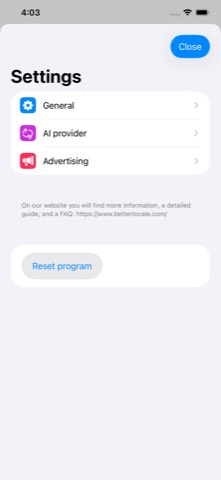
Help. A six-page onboarding walks you through the key areas on first launch, and a six-part tutorial goes deeper – including an understandable guide to creating an AI provider account. A "what's new" system shows you what changed after every update, and you reach the developer directly via the built-in feedback form or by email at support@onetwoapps.com.
One-time · No subscription · No in-app purchases
You pay once and can then use the app normally afterward, with no ongoing costs or fine-print restrictions. The app is continuously developed further – workflow improvements, editor optimizations, and new AI services included.
A fair note: AI usage is billed directly by the respective provider via your own API key – the app doesn't earn anything from it.
AI Text Editor stores your texts and documents exclusively locally on your iPhone or iPad. With iCloud enabled, they are additionally synced in encrypted form via your private iCloud database. Nothing is transmitted externally unless you deliberately use AI features – and only after you've expressly consented to using that provider. Your API keys remain entirely local in the Keychain. There is no tracking, no analytics services, no advertising, and no servers run by the developer.
No. AI Text Editor costs a one-time €1.99 – no subscription, no in-app purchases, no hidden costs.
Only for the AI features. The editor, text transformations, iCloud sync, printing, sharing, import, and export also work completely without one.
OpenAI, Anthropic Claude, Google Gemini, Perplexity, and xAI Grok – each with several selectable models.
Exclusively locally in your device's Keychain – never in the cloud, never on third-party servers.
Yes. Writing, all 57 text transformations, printing, sharing, import, and export all work completely offline. Only the AI features need an internet connection.
Yes, with a title, emoji, and custom prompt – you can also add over 100 standard templates with a tap.