Writing Markdown with AI – on iPhone and iPad. The focused app for anyone who works with Markdown regularly.

A look inside the app.
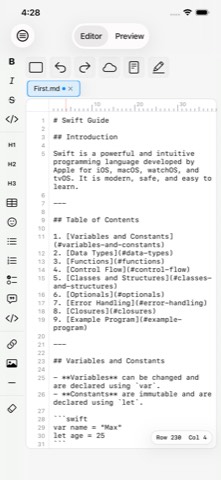
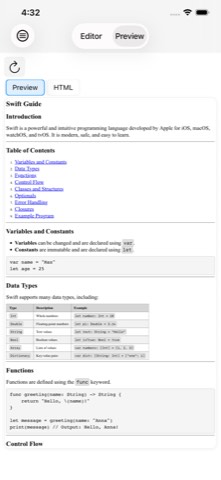
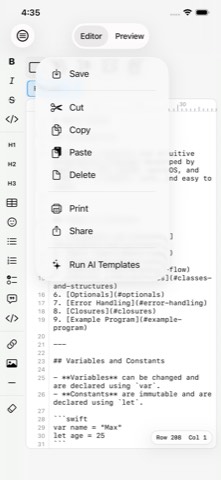
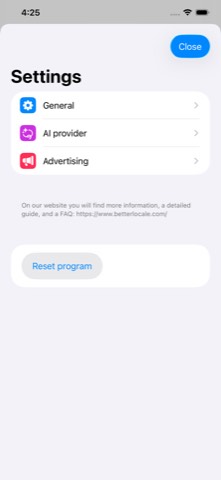
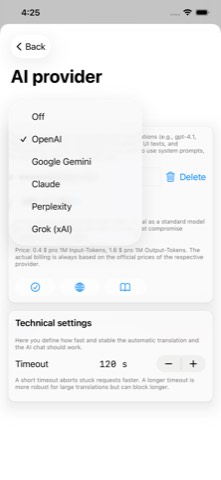
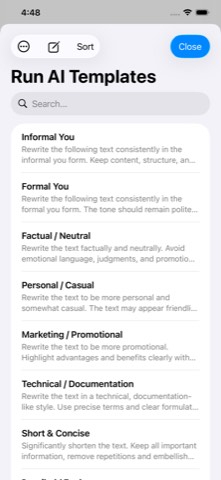
AI Markdown Editor is the focused app for anyone who works with Markdown regularly: developers, technical writers, bloggers, and anyone who writes structured notes. You write clean Markdown and, thanks to the live preview, immediately see the finished result – README files, documentation, technical manuals, knowledge bases, or blog posts, all in a clean, distraction-free interface.
The built-in AI features are entirely optional. You use your own API key with the provider of your choice – Claude, OpenAI, Gemini, xAI, or Perplexity. Without an API key, the app remains a full-featured Markdown editor, with no cloud requirement, no subscription, and no in-app purchases.
An honest, focused Markdown editor that integrates AI as a tool – while letting you stay in control. No servers of its own, no account, no subscription.
While you type, the app renders your Markdown instantly. Side by side on iPad, via a toggle on iPhone.
Monospace font, line numbers, a column ruler, and cursor position. Autocorrect is disabled.
Tables, task lists, and code blocks are fully supported and rendered correctly.
Open as many documents as you like at once, with a change indicator per tab.
Five providers to choose from: Claude, OpenAI, Gemini, xAI, and Perplexity – with your own API key.
Proofread, summarize, rephrase – the AI always returns clean, ready-to-use Markdown.
Documents sync automatically through your private iCloud, including conflict detection.
Print via AirPrint, save as PDF, or share as an .md file through the Share Sheet.
Monospace font, line numbers, disabled autocorrect and smart quotes.
API keys only in the Keychain, an explicit consent dialog before first AI use per provider.
The app in everyday use – from the editor to AI integration.
The editor. The editor is consistently built around Markdown: a clear monospace font, line numbers along the edge, a column ruler, and a cursor position indicator. Autocorrect and smart quotes are deliberately disabled so your syntax stays valid. As you write, the app renders your Markdown in real time as a formatted preview with full support for GitHub Flavored Markdown. On iPad, editor and preview sit side by side in a freely resizable split layout; on iPhone you switch via a toggle. Documents open as tabs with a change indicator, and undo/redo runs through its own history – on iPad also the classic way via Cmd+Z.
iCloud, printing, and sharing. Your documents sync automatically via CloudKit in your private iCloud database – the developer has no access to it, and there are no servers of its own. If a document is changed on another device while you're editing it locally, the app reliably detects the conflict and lets you decide. Using the system print dialog, you print the formatted preview or the raw text, save your document as a PDF, or share it as an .md file via the Share Sheet.
AI services. At the heart of it are the AI templates: reusable prompts for exactly your tasks, such as correcting, summarizing, translating, or structuring documentation clearly. The app sends your prompt together with the entire document to the chosen provider and enforces that only clean, directly usable Markdown comes back – no chit-chat, no code block wrapper. Five providers are available: Anthropic Claude, OpenAI, Google Gemini, Perplexity, and xAI Grok, each with your own API key and explicit consent per provider.
AI setup. For the AI features you need your own API key from your chosen provider. Five steps get you ready: create an account, create an API key in the developer area, store it securely, activate billing, and enter the key in the app's settings. Saved keys are shown masked and stored exclusively in the iOS Keychain; a connection test immediately checks that everything works.
AI chat. Alongside the templates, there's a dedicated chat area for free-form questions, independent of your document: your question at the bottom, the answer at the top. Handy for syntax questions, phrasing ideas, or a quick rough draft. Unlike the templates, the chat sends only your input – never your document – and remembers only the last question and answer.
Left toolbar. A vertical command palette on the left edge inserts all the important Markdown elements with a tap, organized into four groups: inline formatting (bold, italic, strikethrough, code) as toggles, blocks (headings, tables, lists, task lists, quotes, code blocks), structure (links, images, dividers), and "Neutralize", which escapes Markdown special characters in selected text. Permanently visible on iPad, shown on demand on iPhone.
Help. A six-page onboarding walks you through the core topics on first launch, and an eight-chapter tutorial dives deeper into Markdown syntax and AI use step by step. A "what's new" view shows you what changed after every update, and the built-in feedback feature by email gets you straight to support.
One-time · No subscription · No in-app purchases
You pay once and can then use the app normally afterward, with no ongoing costs or fine-print restrictions. The app is continuously developed further.
Only the optional AI usage is billed directly by the respective provider via your own account – the app itself doesn't earn anything from it.
AI Markdown Editor stores your documents exclusively locally on your iPhone or iPad. With iCloud enabled, they are additionally synced in encrypted form between your Apple devices – the developer has no access to this. Nothing is transmitted externally unless you deliberately trigger AI features: with AI templates, your prompt and the currently open document are sent; with the AI chat, only your input. You must expressly consent before first using each provider. Your API keys remain entirely local in the iOS Keychain. No trackers, no analytics services, no advertising.
No. AI Markdown Editor costs a one-time €1.99. Only the optional AI usage is billed directly by the respective provider via your own account.
Yes, without any limitations. Without an API key, the app is a full-featured Markdown editor with live preview, tabs, iCloud sync, printing, and sharing.
Anthropic Claude, OpenAI, Google Gemini, Perplexity AI, and xAI Grok – each with current models and a cost note.
Only what you actively trigger: an AI template sends your prompt and the full document, the AI chat sends only your input. No automatic transmission in the background.
Yes. It's stored exclusively in the iOS Keychain and shown masked in the app – only the last four characters are visible.
Yes, via the iOS Files app or the Share Sheet – documents can also be printed or saved as PDF.